PHP2Shell: the flaw that lets anyone take over a PHP site without a password, and what to do today
On 21 October 2026 PHP fixed two flaws that let an attacker run code on the server with a single request and no login. The first attacks showed up before the fix did. Who is exposed, what to update, and what to rotate if your site fell behind.

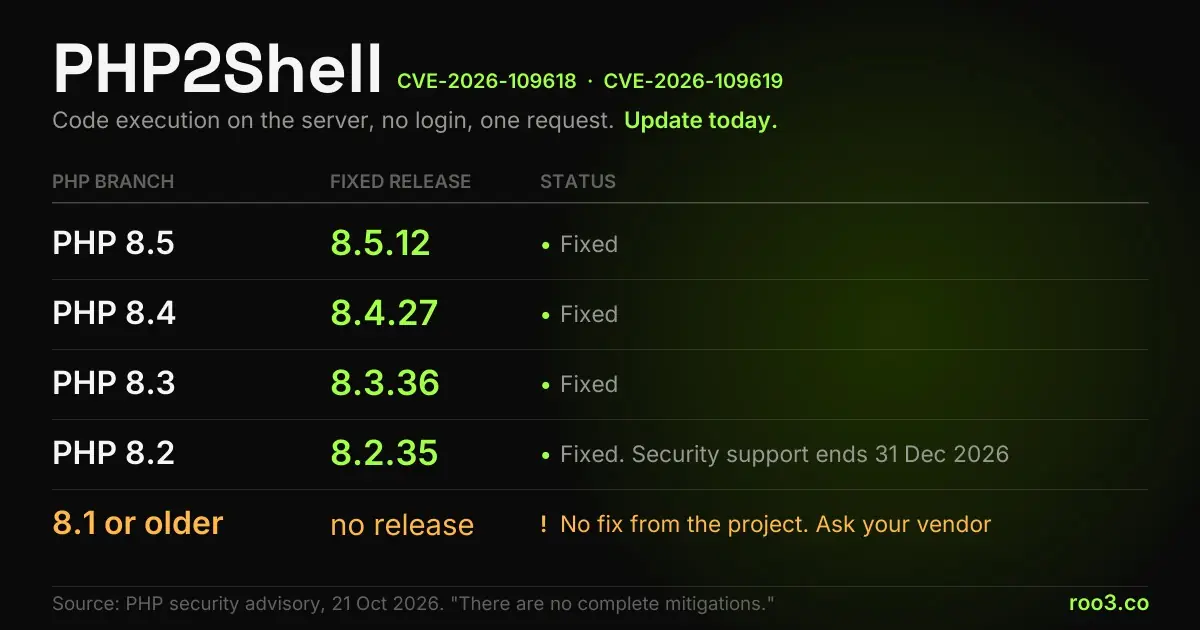
PHP2Shell is the name given to two critical PHP flaws, CVE-2026-109618 and CVE-2026-109619, fixed on 21 October 2026. They let someone with no login run code on the server using the kind of request a browser sends for a form with a file attached, and one of them also returns chunks of memory from other requests, which is where passwords and keys pass through. The fixed versions are 8.5.12, 8.4.27, 8.3.36 and 8.2.35. The PHP project itself says there are no complete mitigations and that updating is the only safe choice. Since the first attacks were seen hours before the fix was out, anyone running a PHP site needs to confirm today which version the server actually serves to visitors.
What you get from this article
- There are two flaws: CVE-2026-109618, remote code execution through corruption after running out of memory, and CVE-2026-109619, remote code execution through global state left over from one request to the next.
- No login and no bug in your own code is needed. The problem is in PHP itself, and the default configuration is vulnerable.
- Fixed versions: 8.5.12, 8.4.27, 8.3.36 and 8.2.35, released on 21 October 2026.
- The PHP project says there are no complete mitigations. Cloudflare, which blocks the attack at its firewall, asks customers to update anyway.
- PHP 8.1 and older get no fix from the project. Some hosting vendors shipped their own, and only yours can confirm it.
- The flaw was found with AI models, the first part by Calif using GPT-5.6 Sol in August, and it had been in the code since 2012.
- If you ran a vulnerable version after the disclosure, treat passwords and keys stored on that server as possibly leaked.
What was fixed on 21 October
On the morning of 21 October 2026, Brazil time, the PHP project shipped four releases at once, 8.5.12, 8.4.27, 8.3.36 and 8.2.35, together with a security advisory whose title needs no interpretation: critical remote code execution vulnerabilities, update now. There are two flaws, tracked as CVE-2026-109618 and CVE-2026-109619. Researchers called the pair PHP2Shell, because the practical outcome is getting a shell on somebody else's server.
PHP describes the first one as remote code execution through corruption after an out-of-memory condition. The second, as remote code execution through global state that goes stale between one request and the next. Neither needs a login, a password or a vulnerable form on your site. And the second has a side effect as worrying as the takeover: it returns pieces of server memory, which is exactly where passwords, session tokens and API keys from other requests pass through.
What sets the urgency is a sentence repeated in all four release notes: there are no complete mitigations, and updating is the only safe choice. When the people who maintain the language write that, configuration tweaks and temporary blocks become stopgaps. What fixes it is the new version running on the server.
The disclosure also came earlier than planned. According to Tenable's summary, the vulnerability identifiers leaked on 20 October, and PHP, which had scheduled the fix for the 22nd, moved the release up by a day.
Why a flaw in PHP weighs so much
PHP is the server-side language of 69.3% of websites whose language W3Techs can identify. That count includes nearly every WordPress site, a large share of online stores, booking systems, members areas, hosting control panels and plenty of custom CRMs. When the defect is in the language, it applies to everything built on top of it at once.
The difference from a plugin flaw, the kind most businesses already know, is where the problem lives. An outdated plugin exposes the sites that use that plugin. Here, a site can have WordPress, its theme and its plugins fully up to date and still be vulnerable, because the defect is in the interpreter that reads the request before WordPress runs. Sansec, a company that tracks attacks on online stores, says the default configuration is vulnerable and lists WordPress, WooCommerce, Magento, Drupal, Joomla, Laravel and phpMyAdmin among the systems affected in the researchers' tests.
How PHP is installed does not save anyone either. The advisory covers Apache with mod_php, PHP-FPM, php-cgi, FrankenPHP and LiteSpeed, the last one common on shared hosting. PHP rates the risk highest for mod_php, the mode where PHP lives inside the Apache process, because there the attack can run before a single line of application code.
How the attack works, without a recipe
Without going into anything that would help an attacker, the mechanism is easy to follow. Every known trigger is a multipart/form-data request, the format a browser uses to submit a form with a file attached. PHP parses this kind of request on its own, before handing the data to the site, and anyone can send one to any PHP address, whether there is a form there or not.
The first flaw abuses what happens when a request blows through the memory limit in the middle of that parsing. The PHP engine should abort cleanly and instead ends up in a corrupted state that can be used to run code. The second lets state survive from one request into the next, which works both for running code and for reading memory that belonged to someone else. Sansec describes this leak coming back to the attacker inside the session cookie of the response itself.
That matters for anyone who has to investigate afterwards. Apache's default access log records address, date, path, status code and browser, and does not record the content type of the request. A well-crafted attack shows up as an ordinary POST with a normal response. A log with no errors does not prove nothing happened.
The defect is in the interpreter that reads the request before the site runs. Updating WordPress and its plugins never reaches it.
AI found the flaw, and AI also shortens the attacker's timeline
The defect had been in the code since PHP 5.4.0, released in 2012, according to Sansec. OpenAI's Greg Brockman put it at 14 years. Nobody found it in that time. The ones who did, in 2026, were teams using AI models to review code.
According to Fortune, Calif, a California company that specializes in testing AI systems, found the first part of the problem on 1 August using GPT-5.6 Sol, after OpenAI invited it to its Patch the Planet program. OpenAI dug further and found parts showing the flaw was more serious than it first looked. On 19 August, Wiz reached the same problem independently, using Gemini 4 Argon, GPT-5.6 Sol and an in-house tool. The PHP advisory credits Calif, OpenAI and Wiz.
The same report records OpenAI's caveat: the capability that helps find the flaw also helps whoever wants to build the attack, and faster. The case proved it the same day. Cloudflare switched on blocking rules at 03:02 UTC on 21 October, about nine hours before the disclosure, and still logged attack traffic and payload variations trying to slip past those rules. Sansec places the first attacks Cloudflare saw at 07:43 UTC, hours before the official fix was out.
For anyone running a website, the lesson outlasts this case. The gap between a flaw going public and someone trying it against you was already short, and it has shrunk. Security updates are no longer a job for the end of the week. We wrote about this mismatch between capability and verification when the labs asked to slow AI down, and this episode is the hands-on version of it.
What to do today, depending on where your site runs
The question that settles almost everything is which PHP version the server serves to visitors right now. If the number is 8.5.12, 8.4.27, 8.3.36 or 8.2.35, or higher within the same branch, that part is done. If it is lower, or you do not know, the rest of this section is for you.
On shared hosting, the hosting company updates PHP, and you pick in the control panel which version your site uses (in cPanel the screen is called MultiPHP). On the shared servers we checked that day, the fixed packages were installed the same morning as the release. Confirm which version your domain uses and, if it is 8.1 or older, ask support whether that package received the fix.
On a VPS or your own server, the update is on you. Update the PHP packages and restart Apache and PHP-FPM, because a process that was already running keeps the old code in memory until it restarts. Watch for an Ubuntu detail: with PHP installed from a third-party repository, such as the PPA most people use for newer versions, automatic security updates in their default configuration only install packages from the official repositories. PHP from that repository stays put until someone updates it by hand.
Check the result through the web, not the terminal. The PHP that answers on the command line can be a different installation from the one serving the site. On one of the servers we checked, the terminal answered 8.3 while the site ran 8.2. In WordPress, the real version shows under Tools, Site Health, Info tab, Server section. Elsewhere, a temporary file that prints the version, opened in the browser and deleted right after, gives the right answer.
A web application firewall buys time and does not replace the update. Cloudflare itself wrote that customers should patch PHP even with the protection on, and the attack variations it logged trying to get past its rules show why.
- Find out which version the site serves over the web: 8.5.12, 8.4.27, 8.3.36 and 8.2.35 are fixed.
- Shared hosting: check the version selected in the panel and, if it is 8.1 or older, confirm the fix with support.
- VPS: update the PHP packages and restart Apache and PHP-FPM in the same step.
- Ubuntu with PHP from a PPA: the default automatic updates do not cover that repository.
- Firewall or no firewall, update. The block only holds until the update lands.
If your site was exposed before you updated
Because the second flaw reads memory from other requests, the possible damage reaches beyond the server that was broken into. Anything that passed through PHP's memory in that window may have leaked: passwords of people who logged in, session tokens, API keys for the payment gateway, the email service or the AI provider, the database password. Sansec even mentions certificate private keys.
The sensible call is to treat as possibly leaked whatever is expensive to lose and cheap to replace. In order: payment keys and keys for pay-per-use services, the database password, admin passwords, and open sessions, which you end by forcing everyone to log in again. Rotating an API key takes minutes. A leaked key in someone else's hands costs you the month's bill and, for a payment gateway, your customers' money.
If there is any sign that customers' personal data left the building and you operate in Brazil, the LGPD comes into play. Article 48 requires the controller to notify the ANPD and the data subjects of any incident that may cause relevant risk or harm, and ANPD Resolution No. 15 of 2024 set the deadline at three business days from when the company learns of it, doubled for small processing agents. In that situation, talk to your lawyer before notifying. Our piece on LGPD and customer data helps structure that conversation.
And keep the logs for that window before rotation deletes them. They cannot prove that nothing happened, but they are the only chance to prove that something did, and any forensic review will ask for them first.
Old PHP became a risk with a due date
The PHP advisory is blunt about old versions: 8.1 and older no longer receive updates from the project. Some distributions and vendors ship their own backported fixes, and the official advice is to ask your vendor or move to a supported version.
We checked this in the packages on the servers we manage. The PHP 8.1 build shipped by cPanel received a backported fix for both flaws on 20 October, and the PHP 7.4 maintained by CloudLinux got its own on 21 October, which also switches off the session upload progress feature, part of the attack path. Sites on 7.4 on those servers were covered this time because the vendor chose to fix it. Next time, it may choose not to.
PHP 8.2 receives security fixes only until 31 December 2026. Plenty of sites run on it today, including on well-run hosting, and moving to 8.3 or 8.4 needs testing: old plugins, abandoned themes and integrations written years ago are what usually breaks. The time to migrate calmly is now, with two months of slack, and not in the first week of January, after the next flaw.
The question that applies to any site
Take the flaw's name out of the picture and one question is left that will serve for the next one: who updates your site's PHP, and how do you know they did? If the answer is "the hosting company, I think", you are with the majority, and that works until the day the site sits on a version the host no longer fixes, or on a server nobody has looked at since handover.
At ROO3 we build sites that show up on Google and in AI answers and look after the part nobody sees: we choose the PHP version, track the fix on the day it ships and measure what visitors actually get, instead of trusting the panel. On 21 October that was the job on the servers we manage: configured version for each site, installed package, and the version measured live.
If you do not know which version your site runs, or it sits on a server nobody has updated since it was delivered, talk to us. Checking takes minutes, and the answer protects you more than any firewall.
Frequently asked questions
Is my WordPress site vulnerable to PHP2Shell?
If it runs a PHP version older than the fixed ones, yes, even with WordPress, its theme and its plugins up to date, because the flaw is in PHP and not in WordPress. The fixed versions are 8.5.12, 8.4.27, 8.3.36 and 8.2.35, released on 21 October 2026.
Does updating WordPress and plugins fix it?
No. The fix is updating PHP itself on the server. On shared hosting the hosting company does it; on a VPS or your own server, whoever runs the server does, and they also need to restart Apache and PHP-FPM afterwards.
How do I find out my site's PHP version?
In WordPress, under Tools, Site Health, Info tab, Server section. On cPanel hosting, the MultiPHP screen shows the version selected for each domain. The definitive proof is the version the site serves over the web, because the server's command line may use a different PHP installation.
I use Cloudflare. Am I protected?
Better protected, not fixed. Cloudflare switched on blocking rules before the disclosure, logged attack variations trying to get past them, and recommended that customers update PHP even with the protection active. The PHP project says there are no complete mitigations.
Do I need to change passwords and keys?
If the site ran a vulnerable version after 21 October, treat whatever passes through server memory as possibly leaked: payment keys and keys for pay-per-use services, the database password, admin passwords and open sessions. One of the flaws reads memory from other requests, and the default log does not show whether that happened.
My site runs PHP 7.4 or 8.1. Now what?
The PHP project no longer fixes those versions. Some vendors shipped their own fix, and only yours can confirm whether the server's package got it. Use the scare to plan the migration, preferably to 8.3 or 8.4, because 8.2 stops receiving fixes on 31 December 2026.
- PHP, Security advisory: Critical remote code execution vulnerabilities, update now (21 Oct 2026)
- PHP, PHP 8.3.36 Released! (21 Oct 2026)
- Cloudflare, WAF protection for the PHP vulnerabilities
- Tenable, PHP2Shell: frequently asked questions about CVE-2026-109618 and CVE-2026-109619
- Sansec, PHP2Shell
- Fortune, AI tools discovered the PHP vulnerability (21 Oct 2026)
- W3Techs, usage of PHP as a server-side language
- Mattos Filho, ANPD publishes the security incident reporting regulation (in Portuguese)
Rodrigo Fávaro
Founder of ROO3, a marketing and technology agency in São José do Rio Preto, Brazil. Builds AI products running in production (Tobia, gerar.app, Pense Mercado) and maintains the AI Benchmark, a public ranking of AI models. See ROO3 AI consulting.
X @rodmf LinkedIn rodrigofavaroKeep reading
LGPD and AI: using it without leaking customer data
What Brazilian data protection law requires of anyone using artificial intelligence: lawful basis, sensitive data...
11 min read
Amodei, Altman and Musk asked to slow AI down: what actually changes
Why Dario Amodei asked the industry to slow AI down in September 2026, why Altman and Musk agreed, the July incident...
12 min read
AI for small business: where to start without wasting money
The practical path for a small business to start using AI: how to choose the first task, what to measure, what it costs...
11 min readWant to apply this in your company?
ROO3 diagnoses what can be automated first in your business. The first conversation is free.