Grok Bot 1.0: what it is, what it costs and what changes when you share a bot with your team
SpaceXSI, formerly xAI, released version 1.0 of Grok Bot, an AI agent with its own cloud computer that can now be shared with a team, join Slack and meetings and start tasks without being asked. Here is the pricing, how it works, what a shared bot carries with it and where it helps a small business.

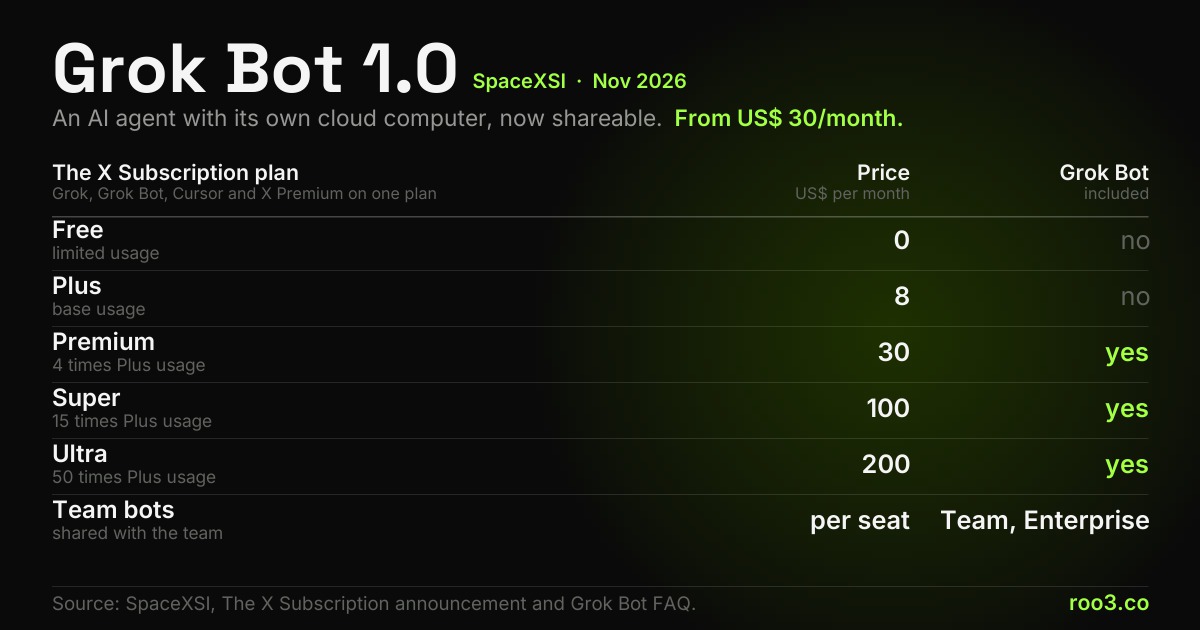
Grok Bot is the AI agent from SpaceXSI, formerly xAI: an assistant with its own cloud computer, with a browser, files and a terminal, that works in apps such as Gmail, Google Drive, Slack and Notion and repeats tasks as routines. Version 1.0 lets you share the bot with your team, bring it into Slack, Microsoft Teams and video calls and let it propose work without being asked. It is included in the Premium (US$ 30 per month), Super (US$ 100) and Ultra (US$ 200) plans of The X Subscription; the Free and Plus plans do not include it. The point of attention for businesses: a shared bot uses the accounts and keys its owner connected for everyone who talks to it.
What you get from this article
- Grok Bot is an agent with a cloud computer: it browses, fills in forms, handles files and works in Gmail, Drive, Calendar, Slack and Notion.
- Version 1.0 brings three changes: bots shared with the team, initiative to propose work and better performance in the browser and in documents.
- It is on the Premium, Super and Ultra plans of The X Subscription, from US$ 30 to US$ 200 per month. Free and Plus do not include it.
- Usage comes from a weekly pool shared with Cursor and the Grok apps; anything beyond the pool is billed in prepaid credits.
- A shared bot uses the apps and keys its owner connected, for everyone who talks to it. Each reply draws on the usage of the person who asked.
- Sign-in and the data policy come from the Cursor account, sold on the same plan. The legacy privacy mode is not supported.
- Team bots only exist on Team and Enterprise plans; video meetings, on Team, Enterprise and Ultra plans.
What Grok Bot is
Grok Bot is the AI agent from SpaceXSI (SpaceX Super Intelligence), the name xAI adopted in 2026. The documentation describes it as an AI teammate with access to a real computer in the cloud: an environment with a browser, a file system and a terminal, shared by the bots on the same account, where they keep working while the user is away.
Chat is the main way to use it, by text, voice note or call. The bot works directly in connected apps such as Gmail, Google Calendar, Google Drive, Slack, Notion and GitHub, and opens in the browser the sites that have no connector. It also accepts MCP servers and custom APIs, which lets a business connect its own system. There are apps for macOS, Windows and Linux, plus iPhone and Android, and you can talk to the bot on X.
One technical detail helps explain the product: Grok Bot uses the Cursor account, the coding tool SpaceXSI sells alongside it on The X Subscription. Sign-in, the team dashboard, the app catalog and the data policy come from there, and the bot can hand coding work to Cursor's agents.
What changes in version 1.0
The official Grok Bot 1.0 page is dated 2 November 2026; the announcement on X came out on 11 November. The product was in beta before that.
Not everything reaches every plan. Bots shared with a team require a Team or Enterprise plan, and joining video meetings requires Team, Enterprise or Ultra; in companies, the admin has to turn meetings on in the settings.
SpaceXSI sums up the release in three changes:
- Shared bots: the bot serves the whole team, in the app, in Slack, in Microsoft Teams and in video calls, and learns from everyone who works with it.
- Initiative: the bot follows projects, notices what needs to be done, offers to do it and brings a person in when a decision needs human judgment.
- More capable: steadier browsing, better documents and presentations, interactive pages edited together, smarter approvals and a dashboard with each bot's usage.
How much Grok Bot costs
The path for new customers is The X Subscription, a plan launched in October that bundles Grok, Grok Bot, Cursor and X Premium. Grok Bot is on the Premium, Super and Ultra plans, for individuals and team seats, at the same price per seat. The Free and Plus plans do not include the bot.
Usage comes from a weekly pool shared between Grok Bot, Cursor and the Grok apps. When the pool runs out, extra usage is billed in prepaid credits. The documentation shows how to turn off auto top-up or set a monthly cap, which is worth doing before you set routines running.
Anyone who already paid for a Cursor plan has Grok Bot included and can keep the old plan. The prices in the announcement are in US dollars.
| Price | Grok Bot | |
|---|---|---|
| Free limited usage | 0 | no |
| Plus base usage | 8 | no |
| Premium 4 times Plus usage | 30 | yes |
| Super 15 times Plus usage | 100 | yes |
| Ultra 50 times Plus usage | 200 | yes |
How Grok Bot works day to day
Each bot has its own memory: it keeps the user's preferences, the rules it was given and a dated log of what it did. Some facts, such as name and time zone, apply to every bot on the account. The documentation recommends giving each bot a single job, because a bot with one role builds more useful context than a generic assistant.
Once the result is right, the task can become a routine on a schedule, and a process shown once can be saved as a skill. Several bots can split a bigger job: one pulls the week's numbers, another writes the campaign, a third reviews it, and they all hand the result back for approval.
To sign in to sites, the bot uses passwords stored in a vault, a connected password manager or a secure form where the person types the password without the bot seeing it. Before sensitive actions, such as sending an email with an attachment, an automatic reviewer decides whether it can proceed or shows a card asking for approval.
What comes along when you share a bot
This is the part that needs the most care in a business. According to the documentation, a team bot uses the apps and keys its owner connected, and they work the same for everyone who talks to the bot. If the owner connected their own inbox or an API key with broad access, whoever gets the bot can ask for work with that access.
SpaceXSI adds safeguards: the bot respects each person's permissions, asks before using a personal account of the person it is talking to and checks whether information is appropriate for a public channel. The documentation itself, however, says to review apps, keys, skills and files before publishing the bot to the team.
Cost is also split in a way that needs attention. A team bot's reply draws on the usage of the person who asked, in the app, in Slack or in a group chat. Slack replies to people without a linked account come out of the team's usage.
At ROO3, Grok already publishes to Instagram through an MCP connector we built into our CRM. The connector was designed to only publish, without reading leads or conversations, because the key an assistant receives sets the size of the possible damage. With shared bots, that rule matters even more: connect only what everyone who will use the bot is allowed to access.
Sharing a bot means sharing the accounts its owner connected to it.
Privacy and data
Grok Bot needs to store data in the cloud, so it does not support Cursor's legacy privacy mode; the account has to switch to the current privacy mode. Training opt-out follows the privacy settings of the Cursor account, and, on a team with privacy mode on, the documentation says customer data is not used to train models.
When the account is deleted, SpaceXSI says bots, chats, the computer and connected apps are removed within 30 days. For a business that handles customer data, this policy goes into the same analysis as Brazil's data protection law, the LGPD: whoever sets up the bot decides which inbox, folder and system it can see.
The bot's memory also needs care. The documentation recommends keeping passwords and cards in the vault, not in memory, and asking the bot to look up figures that change, such as prices, again, because what it remembers may be out of date.
Pros of Grok Bot 1.0
For a business that lives in email, spreadsheets and group chats, the gains are concrete.
The most valuable one is the routine: work someone repeats every week starts coming out on its own, with human approval at the end.
- Its own computer: the bot uses sites and systems that have no integration, the way a person would.
- Scheduled routines: morning briefs, inbox triage, weekly reports and competitor watching run on their own.
- The team in one tool: one bot serves several people and joins Slack, Teams and meetings.
- Protected passwords: the vault and the secure form keep passwords out of the chat.
- Approval before acting: before a sensitive action, the bot shows a card and waits for the OK.
- Open integration: it accepts MCP and APIs, so a business can connect its own system.
Cons and limits
The limits are in the documentation itself and weigh more on small businesses and on anyone outside the United States.
There is also a gap in evidence: the version 1.0 announcement brings no benchmark or task success rate, so evaluating it depends on your own testing.
- Team bots only on team plans: sharing requires Team or Enterprise, and video meetings require Team, Enterprise or Ultra.
- Accounts shared too widely: a team bot uses the owner's apps and keys for everyone.
- Variable cost: the weekly pool is shared with Cursor and Grok, and the excess becomes prepaid credit.
- Prices in US dollars: the announcement only gives dollar prices.
- Dependence on Cursor: sign-in, dashboard and data policy come from the Cursor account.
- Initiative needs limits: a bot that proposes work on its own needs clear rules about what it can do without asking.
Where to start in a small business
The best test is a task someone on the team does every week, with a clear start, end and a result that is easy to check. The documentation has examples that fit almost any business: a summary of what changed in email and calendar, inbox triage with draft replies and tracking competitor prices.
Three rules avoid most problems:
- One bot, one job: give each bot a single role and say what to deliver, where to get the information and when to stop and ask.
- Drafts first: keep "do not send anything" for the first weeks and only allow sending after checking the pattern of the replies.
- Minimum access: connect only the inbox, folder and system the bot needs, especially before sharing it.
Where ROO3 comes in
Grok Bot 1.0 raises the same question we ask about an AI agent from any maker: which work in your business can run on its own, with what access and with whom checking it?
At ROO3, we build AI automations and agents for businesses, connect the company's system through connectors with minimum access and measure cost and accuracy before anything goes to production. Our AI consulting starts with the list of tasks worth delegating.
If you want to test an agent in your operation without opening the whole company to it, talk to us.
Frequently asked questions
What is Grok Bot?
It is the AI agent from SpaceXSI, formerly xAI. It has its own cloud computer, with a browser, files and a terminal, works in apps such as Gmail, Google Drive, Slack and Notion and repeats tasks as routines, asking for approval before sensitive actions.
How much does Grok Bot cost?
It is included in the Premium (US$ 30 per month), Super (US$ 100) and Ultra (US$ 200) plans of The X Subscription, which also give access to Grok, Cursor and X Premium. The Free and Plus plans do not include the bot. Usage comes from a weekly pool, and the excess is billed in prepaid credits.
What changed in Grok Bot 1.0?
Version 1.0 lets you share the bot with your team and bring it into Slack, Microsoft Teams and video calls, lets the bot propose work without being asked and improves browsing, documents, presentations and approvals.
Can I share a Grok Bot with my team?
Yes, on Team and Enterprise plans. A shared bot uses the apps and keys its owner connected for everyone who talks to it, and each reply draws on the usage of the person who asked. The documentation recommends reviewing apps, keys, skills and files before sharing.
Does Grok Bot use my data to train AI?
Training opt-out follows the privacy settings of the Cursor account. On a team with privacy mode on, the documentation says customer data is not used for training. The bot does not support the legacy privacy mode, because it needs to store data in the cloud.
What is the relationship between Grok Bot and Cursor?
Grok Bot uses the Cursor account for sign-in, the team dashboard and the data policy, and it can hand coding work to Cursor's agents. The two are sold together on The X Subscription.
- SpaceXSI, Introducing Grok Bot 1.0 (2 Nov 2026)
- SpaceXSI, Introducing The X Subscription (12 Oct 2026)
- SpaceXSI, Grok Bot documentation: overview
- SpaceXSI, Grok Bot documentation: get started
- SpaceXSI, Grok Bot documentation: team bots
- SpaceXSI, Grok Bot documentation: approvals, security and privacy
- SpaceXSI, Grok Bot documentation: FAQ
- @SpaceXSI on X, Grok Bot 1.0 announcement (11 Nov 2026)
Rodrigo Fávaro
Founder of ROO3, a marketing and technology agency in São José do Rio Preto, Brazil. Builds AI products running in production (Tobia, gerar.app, Pense Mercado) and maintains the AI Benchmark, a public ranking of AI models. See ROO3 AI consulting.
X @rodmf LinkedIn rodrigofavaroKeep reading
What Grok is, the SpaceXAI AI, and where it stands apart
What Grok is, the AI now owned by SpaceXAI: how it uses X data in real time, where it has the edge, where it gets in...
9 min read
What agentic AI is: the difference between answering and doing
What agentic AI is, what separates an agent from a chatbot, where it genuinely works today, and the mandatory...
10 min read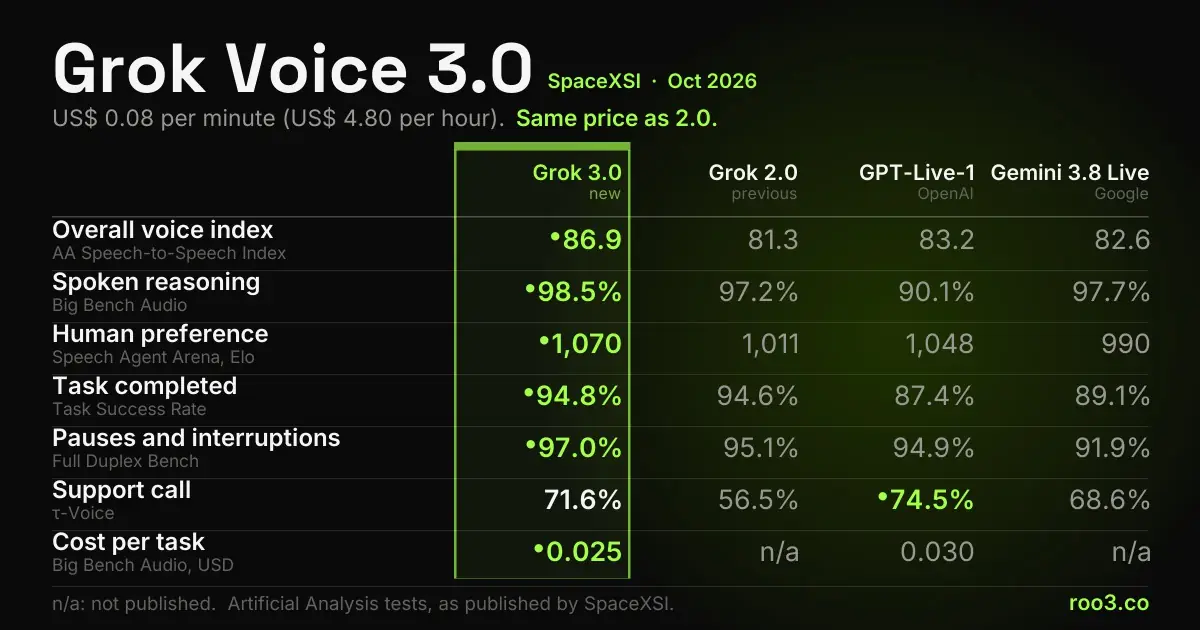
Grok Voice 3.0: benchmarks, pricing and what changes for agents
Grok Voice 3.0 benchmarks against GPT-Live-1 and Gemini 3.8 Live, price per minute and per task, Brazilian Portuguese...
11 min readWant to apply this in your company?
ROO3 diagnoses what can be automated first in your business. The first conversation is free.