Gemini Omni 1.2 Flash: what it is, what it costs, how to use it and where it still falls short
On 5 November 2026 Google released a new version of its video model, with 15-second clips, conversational editing and a 30% lower price. Here is what each resolution costs, where to use it, what it does well and the limits in the documentation, including languages other than English that have not been evaluated.

Gemini Omni 1.2 Flash is Google's video generation and editing model, released on 5 November 2026. It creates clips of 3 to 15 seconds with native audio from text, images or video, and lets you fix the result through conversation instead of starting over. On the API it costs about US$ 0.07 per second at 720p, 30% less than Omni 1.1, or roughly US$ 1.04 for a 15-second clip. The API has no free tier, but Google Vids generates clips at no additional cost. It suits product videos, ad variations and explainers. The limits matter: the documentation says only English has been evaluated, certain recognizable people are not accepted and the announcement includes no benchmark score.
What you get from this article
- Gemini Omni 1.2 Flash generates and edits video of 3 to 15 seconds with native audio, from text, images or video.
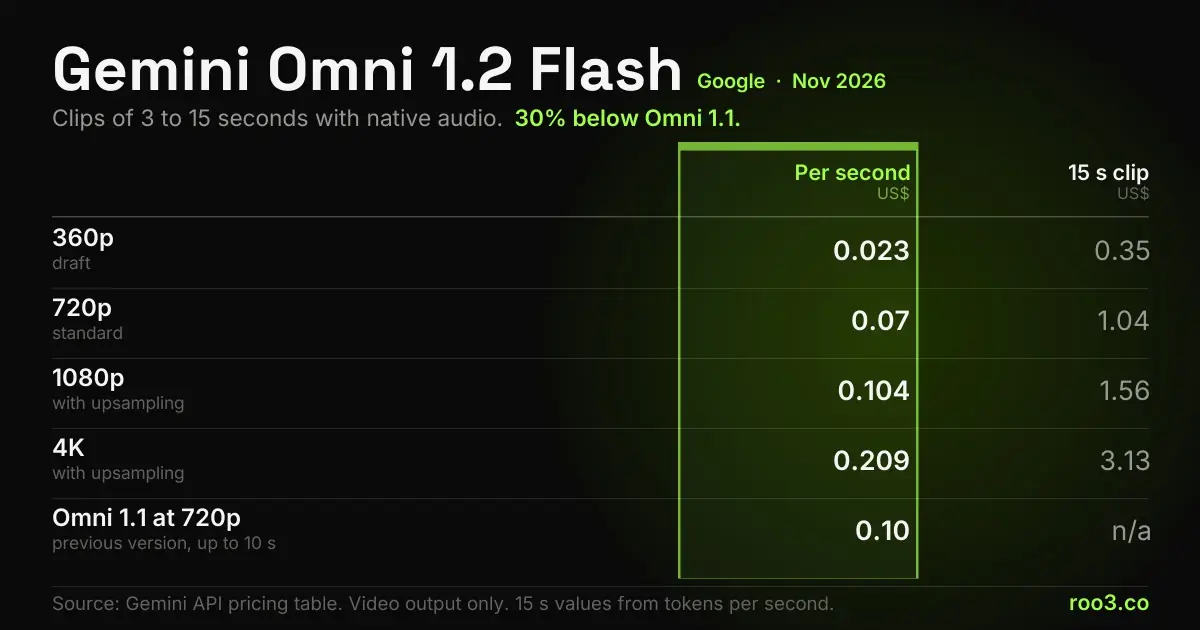
- On the API it costs about US$ 0.023 per second at 360p, US$ 0.07 at 720p, US$ 0.104 at 1080p and US$ 0.209 at 4K.
- The price dropped 30% from Omni 1.1, and on 3 December 2026 calls to 1.1 start running on 1.2 with no code change.
- The API has no free tier; Google Vids generates 15-second clips at no additional cost.
- The workflow that saves money is drafting at 360p or 720p, fixing through conversation and upscaling only the approved clip.
- The documentation says only English has been evaluated, and editing with certain recognizable people is not accepted.
- Google itself warns that fast sports action, rapid script changes and complex physics still need work.
What Gemini Omni 1.2 Flash is
Gemini Omni 1.2 Flash is a model in the Gemini family for creating and editing short videos. It takes text, images and video as input and returns video with native audio, including speech, music and sound effects. The API identifier is gemini-omni-1.2-flash.
What sets it apart from a typical generator is conversation. After creating the clip, you ask for a change in plain language, such as swapping the background, changing the lighting or replacing a product, and the model alters that point while keeping the rest of the scene. DeepMind, Google's AI lab, compares Omni to Nano Banana, the company's image model, applied to video.
Omni is recent. The preview reached the API on 30 June 2026, version 1.1 on 27 August and version 1.2 on 5 November. On the Gemini API, 1.1 was already a generally available version; Google describes 1.2 as the first general availability of Omni backed by Google Cloud infrastructure, with reserved capacity and a SynthID watermark on videos.
What changed from Omni 1.1
The main jump is in length: from 10 to 15 seconds, selectable one second at a time from 3. The price of 720p video fell from about US$ 0.10 to US$ 0.07 per second, and editing now accepts video of up to 15 seconds. Google says it improved consistency of faces, clothing, packaging and brand colors, speech and camera movement, with fewer unwanted jump cuts. Those quality improvements are the maker's claims.
If you have already integrated the API, there is a date on the calendar. On 3 December 2026, calls to gemini-omni-1.1-flash start running on 1.2, with no code change and at the new rate. Since the model changes, test the prompts you have in production beforehand. Google also doubled paid-tier rate limits.
| 1.2 Flash new | 1.1 Flash previous | |
|---|---|---|
| Clip length generation and editing | 3 to 15 s | 3 to 10 s |
| Input video for editing | up to 15 s | up to 10 s |
| Price at 720p per second of video | US$ 0.07 | US$ 0.10 |
| Video price per million tokens | US$ 12.00 | US$ 17.50 |
| Resolutions output | 360p to 4K | 360p to 4K |
| Frames per second output | 24 | 24 |
How much Gemini Omni 1.2 Flash costs
On the Gemini API, billing is per output token, and the documentation converts that into a price per second. Video costs US$ 12 per million tokens, and each resolution uses a different number of tokens per second. Input costs US$ 1.50 per million tokens and text output, which includes thinking tokens, US$ 9. That is why the final bill can land a little above the table below: on Segmind, which resells the model, 720p came to about US$ 0.075 per second in a published test.
The API has no free tier. Paid-tier limits run from 8 requests per minute and 40 per day at tier 1 to 40 per minute and 2,000 per day at tier 3. Outside the API, Google says Google Vids generates 15-second clips at no additional cost with a Google account or Google Workspace subscription, and the Gemini app gets the feature first for Google AI Ultra subscribers.
A worked example, using the video price only: ten 15-second drafts at 360p add up to about US$ 3.48, and two final versions at 1080p add US$ 3.13. That is about US$ 6.60 for one round of ad creation, not counting input, thinking and the time of whoever reviews it.
| Per second | 15 s clip | |
|---|---|---|
| 360p draft | US$ 0.023 | US$ 0.35 |
| 720p standard | US$ 0.07 | US$ 1.04 |
| 1080p with upsampling | US$ 0.104 | US$ 1.56 |
| 4K with upsampling | US$ 0.209 | US$ 3.13 |
Where to use it and how to start
The route depends on who will use it. To try it without code, Google Vids and Flow are the way in. To build the model into a product or automate volume, the answer is the API.
The rollout is gradual, so some of these options may take a while to appear in your account:
- Google Vids: creates 15-second clips and combines them with avatars, music and narration for explainers, teasers and sales pitches.
- Flow: Google's tool for directing scenes and making multi-turn edits.
- Gemini app: 15-second videos, rolling out first to Google AI Ultra subscribers.
- Google Ads: uses the model to scale video campaigns.
- Google AI Studio and Gemini API: prototyping and integration, through the Interactions API.
- Google Cloud: console, API and reserved capacity for production.
- Gemini for business: video creation right in the chat, announced as coming soon.
What it is good for
Google positions the model for everyday video made in volume: product videos, virtual try-ons and ads. On the Google Cloud blog, Photoroom says it uses Omni to turn product photos into ads, and QuickFrame AI to create a connected TV ad in a single generation. These are customer statements published by the maker.
The most detailed test we found is by Rohit Rao, of Segmind: 20 tests and US$ 16.17 in credits. The company resells the model, so it is not a neutral source, but it published costs and failures. The best results came in labeled explainers, kinetic typography, chart animation from a finished last frame, single-element edits on real footage and product videos with callouts. For photoreal people created from scratch and brand films, he prefers Seedance, from ByteDance.
The workflow Google recommends to spend less has three steps:
- Draft at 360p or 720p, with reference images of the product or character. The API accepts up to 6 images.
- Fix what is wrong through conversation, instead of generating the clip again.
- Upscale to 1080p or 4K only the approved version.
Advantages of Gemini Omni 1.2 Flash
The advantages below come from Google's documentation and announcements, and the last one from the Segmind test.
For a small business, the most concrete gain is the cost of being wrong: when a draft costs cents, you can try several ideas before paying for the final version.
- Price per clip: 15 seconds at 720p for about US$ 1.04 of video.
- Conversational editing: swap background, product, lighting and format without restarting the clip.
- Audio in the same video: speech, music and sound effects come out together, with no separate step.
- Visual references: product and character images help hold faces, packaging and colors from start to finish, according to Google.
- Exact duration: set one second at a time, useful for fixed-length spots, in 16:9 and 9:16.
- Extension: 3 to 10 seconds at a time, up to 30 seconds in total.
- Provenance: every video carries the invisible SynthID watermark, and the Google Cloud documentation lists C2PA support.
- Data on the paid tier: the pricing table states that this use does not go toward improving Google's products.
- On-screen text: Segmind reports labels and titles coming out as written in explainers.
Disadvantages and limits of Gemini Omni 1.2 Flash
The points below are in the Gemini API documentation, in the announcement itself or in the Segmind test. The first one weighs most on anyone producing in a language other than English.
The documentation states that English is fully supported and that other languages have not been evaluated, so results can vary. Speech and text in other languages need testing before they go into a campaign.
- Real people: uploading and editing images with certain recognizable people is not accepted. Segmind reports blocks on celebrity names and on edits to footage with real brand logos.
- Short video: 15 seconds per generation and 30 with extension, which only appends to the end of the clip.
- Two formats: 16:9 and 9:16. The API does not list 1:1 or 4:5.
- Limited audio: the API accepts no audio uploads and no voice editing, so you cannot use a real voice-over recording as a reference.
- Physics and speed: Google warns that fast sports action, rapid script changes and complex physics are still in development.
- Needs review: in Segmind's tests, about one instruction in four was skipped, and a map with four stops duplicated labels.
- Missing controls: the API accepts no system instructions or negative prompts. A request to avoid something goes in the prompt text.
- Safety filters: they act on the input and on the generated video, and they vary by region.
- 1080p and 4K cost more: the table lists those prices as output with upsampling, at up to US$ 0.209 per second.
What cannot be stated yet
Three points differ between Google's own documents. On audio references, the Google blog mentions audio cues as input, the Google Cloud blog says the feature is gated behind allowlisting, and the Gemini API documentation says audio uploads are unsupported in the current version. On reserved capacity, the blog and the Google Cloud documentation say it exists and the Gemini API documentation says it does not; the consistent reading is that it applies on Google Cloud. On reference images, the Gemini API documentation says up to 6, and the Google Cloud one up to 10 images per prompt.
On performance, the announcement includes no benchmark score, and as of this writing we found no reliable independent ranking of version 1.2. The comparison with Seedance comes from a single test, by a company that sells both routes.
We also make no price comparison with competitors. The Seedance figures we found come from resellers and vary too much for a fair calculation. The Gemini API pricing and models pages, checked on 5 November, no longer list Veo, so this article does not compare with it either.
Who it is worth it for
It is worth it for anyone producing short video in volume who accepts reviewing it: stores with catalogs, agencies that need ad variations, teams making product explainers and anyone already working in Google Vids or Google Ads.
It is worth less for brand films with realistic people, for pieces that depend on speech in another language with no human review and for anyone who needs the face or voice of a real person. In those cases, a real shoot or another model tends to be the safer route.
A cheap test settles the question. Pick one product, generate three drafts at 360p from a real photo, with speech and text in your language, and check whether the pronunciation and labels come out right before planning volume.
Where ROO3 comes in
Cheap video does not fix a weak ad. A campaign's result depends on the offer, the page that receives the click and measuring the cost of each contact.
At ROO3, our paid media management already includes creatives generated and tested with AI, alongside the landing page and tracking of each lead through to the CRM. When a company wants to produce AI video in-house, our AI consulting helps choose the tool for each piece and set up the review routine.
If you want to try AI-generated video in your campaigns, talk to us.
Frequently asked questions
What is Gemini Omni 1.2 Flash?
It is Google's video generation and editing model, released on 5 November 2026. It creates clips of 3 to 15 seconds with native audio from text, images or video, and lets you edit the result through conversation.
How much does Gemini Omni 1.2 Flash cost?
On the API, video costs about US$ 0.023 per second at 360p, US$ 0.07 at 720p, US$ 0.104 at 1080p and US$ 0.209 at 4K. A 15-second clip at 720p costs about US$ 1.04. Input and text tokens are billed separately.
Is Gemini Omni 1.2 Flash free?
The API has no free tier. Google says Google Vids generates 15-second clips at no additional cost with a Google account or Google Workspace subscription.
What is the maximum video length?
It is 15 seconds per generation, selectable one second at a time from 3. With extension, which appends 3 to 10 seconds at a time to the end of the clip, a video can reach 30 seconds.
Does Gemini Omni work in languages other than English?
It may, but Google's documentation says only English is fully supported and other languages have not been evaluated. Test speech and text in your language before using it in a campaign.
Can I use a photo of a real person?
The documentation says uploading and editing images with certain recognizable people is not accepted. Even when the system accepts it, use only images of people who gave their permission.
What is the difference between Omni 1.2 and Omni 1.1?
Version 1.2 goes up to 15 seconds, against 10 for 1.1, and costs 30% less, at US$ 0.07 per second at 720p against about US$ 0.10. On 3 December 2026, API calls to 1.1 start running on 1.2.
How can I tell whether a video was made with Gemini Omni?
All generated videos carry the SynthID watermark, invisible to viewers and detectable by software. The Google Cloud documentation also lists support for C2PA content credentials.
- Google, Gemini Omni 1.2 Flash: Fast and cost-effective with longer clips (5 Nov 2026)
- Google Cloud, Gemini Omni 1.2 Flash now generally available (5 Nov 2026)
- Gemini API, Generate and edit videos with Gemini Omni Flash
- Gemini API, Gemini Omni Flash model page
- Gemini API, pricing
- Gemini API, rate limits
- Gemini API, changelog
- Google Cloud, Gemini Omni 1.2 Flash documentation
- Google DeepMind, Gemini Omni
- Segmind, Gemini Omni 1.2 Flash: Google's New Gemini Video API Tested (5 Nov 2026)
- The Decoder, Gemini Omni 1.2 Flash stretches AI video clips to 15 seconds (5 Nov 2026)
Rodrigo Fávaro
Founder of ROO3, a marketing and technology agency in São José do Rio Preto, Brazil. Builds AI products running in production (Tobia, gerar.app, Pense Mercado) and maintains the AI Benchmark, a public ranking of AI models. See ROO3 AI consulting.
X @rodmf LinkedIn rodrigofavaroKeep reading
What Google Gemini is and where it fits best
What Gemini is, where it appears inside Google products, what native multimodality changes in practice and when it is...
9 min read
ChatGPT, Claude or Gemini: how to choose for your use
A practical comparison of ChatGPT, Claude and Gemini: what each does better by design, what does not change with every...
9 min read
AI for small business: where to start without wasting money
The practical path for a small business to start using AI: how to choose the first task, what to measure, what it costs...
11 min readWant to apply this in your company?
ROO3 diagnoses what can be automated first in your business. The first conversation is free.