ChatGPT Images 2.6: what it is, how to make GIFs, what it costs and what got more expensive
On 4 November 2026 OpenAI released a new version of the ChatGPT image generator, with GIFs, reference images and two new API models. The price per token did not change, but the bill per image did at two quality levels. Here is what it is for, its pros and cons, and when it is worth switching.


ChatGPT Images 2.6 is OpenAI's image update, released on 4 November 2026 in ChatGPT, Codex and the API. It generates images 50% faster, according to the company, creates animated GIFs from text or an image, lets you save reference images and, on the API, exports SVG and accepts markup of the area to edit. It reached every ChatGPT plan, with no published numeric limit. The API has two models, Flare for speed and Sunburst for detail, with the same price per token as version 2.5. The difference is in the bill per image: the official calculator shows 4.2 times more tokens at low quality and 3.3 times at medium, so high-volume drafts became more expensive.
What you get from this article
- Images 2.6 brings animated GIFs, saved reference images and generation that is 50% faster, according to OpenAI.
- In ChatGPT it reached every plan; OpenAI has published no numeric limit per plan.
- The API has two models: GPT-Image-2.6 Flare, for fast iteration, and Sunburst, for detailed work.
- The price per token matches 2.5, but a square low-quality image went from about US$ 0.0059 to US$ 0.0247.
- At high, extra high and max quality, the cost per image is the same as the previous version.
- 2.6 has no batch processing, which 2.5 offers at half price.
- On a website, GIFs are heavy: web.dev recommends converting animations to video before publishing.
What ChatGPT Images 2.6 is
ChatGPT Images 2.6 is the November 2026 version of OpenAI's image generator and editor. It creates images from text, edits uploaded images and, for the first time, delivers animated GIFs. OpenAI says people already create 4 billion images a week across ChatGPT, Codex and the API.
The names are confusing. ChatGPT Images 2.6 is the feature inside the app. On the API it appears as two models, gpt-image-2.6-flare and gpt-image-2.6-sunburst, which follow the Flare and Sunburst pair from version 2.5.
According to the announcement, the version is available worldwide in ChatGPT and Codex, on all plans, on desktop, mobile and web. The system card says the safety foundation is the same as 2.5, with extra safeguards for GIFs.
What is new in Images 2.6
Some of the new features apply to anyone using ChatGPT, and some only to people building on the API.
OpenAI highlights speed and motion. The rest of the package targets editing: changing one point of an image without losing what was already right.
- Animated GIFs: created from text or an image. In ChatGPT you can adjust the speed and edit individual frames.
- Reference images: OpenAI says on X that you can save photos of yourself, pets and characters to reuse without uploading them again.
- Speed: 50% faster, according to OpenAI. On the API, Flare generates in as little as six seconds at low quality.
- Consistency: the company promises to hold characters, products and brand details across edits.
- Markup: you circle what should change. The feature already existed in ChatGPT and has reached the API.
- SVG: vector export for icons and illustrations, API only.
- Complexity: a new API setting, with low, medium and high levels, that sets how much the model plans before drawing.
Flare or Sunburst: which model to use
ChatGPT users do not have to choose between the two names. The decision belongs to whoever integrates the API, and both have the same price per token.
OpenAI positions Flare for fast iteration and cites better layouts for posters and product images. Sunburst delivers higher quality and more consistency across edits when quality is set to medium or high. For a character or product edited several times, Sunburst is the one the company points to.
| Flare | Sunburst | |
|---|---|---|
| Intended for OpenAI description | fast iteration | detailed work |
| Speed published figure | 6 s at low quality | not stated |
| Image output per million tokens | US$ 30 | US$ 30 |
| GIF, SVG and markup on the Image API | yes | yes |
How much ChatGPT Images 2.6 costs
In ChatGPT, the feature comes with the plan. The plans page mentions limited creation on Free, more creation on Go, more complex and accurate images on Plus and unlimited, faster creation on Pro, with no number per plan.
On the API, the price table did not change from 2.5: US$ 8 per million image input tokens, US$ 2 cached, US$ 30 for output and US$ 5 for text input. What changed is consumption. The calculator in the official guide uses, for 2.6, 4.2 times more output tokens at low quality and 3.3 times at medium. From high quality up, the number is the same.
In simple terms, a thousand square drafts at low quality go from about US$ 5.88 to US$ 24.69, for output alone. At high quality, the same thousand cost about US$ 52.68 on both versions. The switch is neutral for final pieces and a real increase for anyone generating drafts in volume. The guide itself warns that equal token rates do not mean equal cost per image.
As a market reference, Google lists Nano Banana 2.1 at US$ 0.0336 per 1K image. Price does not measure quality, and this article does not compare the quality of the two.
| 2.6 new | 2.5 previous | Change | |
|---|---|---|---|
| Low low | 0.0247 | 0.0059 | 4.2x |
| Medium medium | 0.0435 | 0.0132 | 3.3x |
| High high | 0.0527 | 0.0527 | same |
| Extra high xhigh | 0.0937 | 0.0937 | same |
| Max max | 0.2107 | 0.2107 | same |
How to use it and what it is for
OpenAI points GIFs at brand mascots, looping product photos, reactions and memes for social media, and storyboards ahead of video production. The official example has 9 frames and loops back after 1.8 seconds. For video with sound and more length, the tool is a different one, such as Gemini Omni 1.2 Flash.
In editing, the gain is working piece by piece. Instead of asking for the image again, you mark what changes and say what must stay. A well-written prompt still matters, and the guide asks you to describe the subject, the motion and the desired loop.
A practical way to start:
- Describe the subject, the motion and how the loop ends, or upload an image and ask for the animation.
- Adjust the speed and fix frames inside ChatGPT.
- For a spot edit, mark the area and say what changes and what stays.
- On the API, use low complexity for simple edits, as OpenAI recommends, and medium or high for scenes with many elements.
- Before publishing on a website, convert the animation to video. web.dev shows that a GIF tends to weigh far more than an equivalent video.
Advantages of ChatGPT Images 2.6
The advantages below come from OpenAI's announcement, documentation and system card.
For a company without a designer, the most direct gain is making an animated mascot and a looping product photo inside a tool it probably already pays for.
- No extra tool: GIFs and editing inside ChatGPT, on all plans.
- Response time: as little as six seconds on Flare at low quality.
- Spot editing: markup points to the exact place, with no extra fee on the API.
- Editable vector: SVG with paths, shapes and colors for icons and illustrations.
- No increase on final pieces: from high quality up, the cost matches 2.5.
- Free adjustment: changing complexity carries no separate fee.
- Provenance: C2PA metadata and the SynthID watermark in ChatGPT, Codex and the API, with a public verification tool.
Disadvantages and limits of ChatGPT Images 2.6
The limits are in OpenAI's own documentation and system card, and the first one only shows up if you do the math per image.
Anyone already running volume generation on the API should test before switching the model in production.
- Costlier drafts: 4.2 times at low quality and 3.3 times at medium, in the official calculator.
- No batch processing: the 2.6 model pages list Batch as not supported. Version 2.5 has it, at half the price.
- Short GIFs with no sound: the API accepts 2 to 16 frames, and the GIF format carries no audio.
- Restricted SVG: API only, one file per request and no editing afterwards. The bill adds the reference image and the model that writes the SVG, with no fixed price.
- Text and composition: the guide warns that the model can still miss text placement and clarity and the exact position of elements.
- Imperfect consistency: the same guide says characters and brand elements can still vary between generations.
- Time on hard requests: complex prompts can take up to 2 minutes.
- High complexity by default: the default level is high, which can add time and introduce unwanted changes.
- GIF moderation: the safeguards detected 77.7% of an adversarial test set, and the system card admits that motion-related violations are hard to catch. GIF rules also block more categories than still-image rules.
- No dated version: the model page lists only the alias, with no fixed snapshot to lock behavior.
What cannot be stated yet
The 50% speed figure is OpenAI's number. We found no independent measurement, and the announcement does not state the basis of the comparison. It also includes no quality benchmark score.
OpenAI has published no limits on images or GIFs per plan, and we found no official help page on saved reference images. So this article does not say how many GIFs each plan allows.
There is a warning sign on Flare. In the system card, across 3,077 requests designed to provoke prohibited content, the share of safe generations fell from 78.36% on 2.5 to 75.04% on 2.6, a statistically significant difference. Unsafe outputs not blocked went from 1.49% to 2.14%, with no significance. OpenAI warns that this test does not represent real use. eesel cited a developer who went back to Flare 2.5 after an hour of use, which is an isolated report, and a good reason to compare with your own prompts.
Who it is worth it for
In ChatGPT it is worth it for almost everyone: the feature comes with the plan and there is nothing to migrate. It is a cheap way to try an animated mascot, social reactions and product pieces.
On the API, it is worth switching right away if you need GIFs, SVG or markup, which are new features, or if you generate at high quality or above, with no increase per image. Anyone generating drafts in volume at low or medium quality, or using batch processing, should measure first.
Anyone who needs video with sound, long pieces or fine layout control still needs another tool or a designer.
Where ROO3 comes in
Generating the image got easy. What stays expensive is publishing without weighing down the site, without losing the brand identity and without repeating pieces that do not convert.
At ROO3, we build sites that show up on Google and in AI answers with measured performance, which includes deciding when an animation should become a video. When a company wants to use image generation day to day, our AI consulting helps choose the tool, work out the real cost per piece and define who reviews it.
If you want to bring AI-generated images into your company's workflow without losing control, talk to us.
Frequently asked questions
What is ChatGPT Images 2.6?
It is the November 2026 version of OpenAI's image generator, available in ChatGPT, Codex and the API. It brings animated GIFs, reference images and generation that is 50% faster, according to the company.
Is ChatGPT Images 2.6 free?
OpenAI says it reached all plans. The plans page lists limited image creation on Free and gives no number. OpenAI has also published no GIF limit per plan.
How do I make a GIF in ChatGPT?
Describe what should move, or upload an image and ask for the animation. You can then adjust the speed and edit individual frames. Also describe how the loop should end.
How much does GPT-Image-2.6 cost on the API?
Image output costs US$ 30 per million tokens. By the official calculator, a 1024 x 1024 image comes to about US$ 0.0247 at low quality, US$ 0.0435 at medium and US$ 0.0527 at high, not counting input.
Did Images 2.6 get more expensive than 2.5?
Per token, no. Per image, yes, at low and medium quality: the official calculator uses 4.2 and 3.3 times more output tokens. From high quality up, the cost is the same.
What is the difference between Flare and Sunburst?
Flare is meant for fast iteration and generates in as little as six seconds at low quality. Sunburst is meant for detailed work and more consistency across edits at medium or high quality. Both have the same price per token.
Can I export SVG in ChatGPT?
The system card lists SVG output for the API only. The file is a static vector, with no scripts or embedded images.
How can I tell whether an image was made with OpenAI?
Images carry C2PA metadata and the invisible SynthID watermark, and OpenAI has a public verification tool for supported files.
- OpenAI, Introducing Images 2.6 (4 Nov 2026)
- OpenAI, ChatGPT Images 2.6 System Card (4 Nov 2026)
- OpenAI, image generation guide, with the cost calculator
- OpenAI, API pricing
- OpenAI, GPT-Image-2.6 Flare model page
- OpenAI, GPT-Image-2.6 Sunburst model page
- OpenAI, API changelog
- ChatGPT, plans and pricing
- OpenAI on X, Images 2.6 announcement (4 Nov 2026)
- OpenAI on X, GIFs in Images 2.6 (4 Nov 2026)
- eesel, ChatGPT Images 2.6: GIFs, the new API models, and what it really costs (5 Nov 2026)
- web.dev, Replace animated GIFs with video
- Gemini API, pricing (Nano Banana 2.1)
Rodrigo Fávaro
Founder of ROO3, a marketing and technology agency in São José do Rio Preto, Brazil. Builds AI products running in production (Tobia, gerar.app, Pense Mercado) and maintains the AI Benchmark, a public ranking of AI models. See ROO3 AI consulting.
X @rodmf LinkedIn rodrigofavaroKeep reading
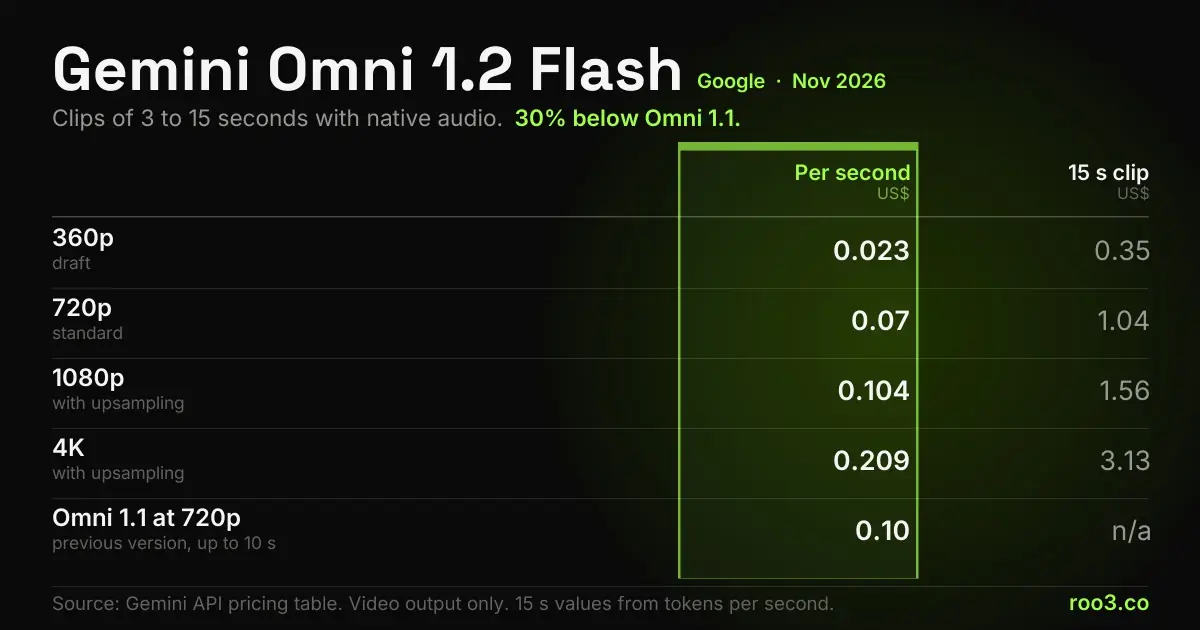
Gemini Omni 1.2 Flash: what it is, pricing, pros and cons
Gemini Omni 1.2 Flash: what it is, price per second, where to use it, the pros and cons of Google's video model and...
11 min read
ChatGPT, Claude or Gemini: how to choose for your use
A practical comparison of ChatGPT, Claude and Gemini: what each does better by design, what does not change with every...
9 min read
How to write a good prompt: the method that works
The method for writing prompts that work: what to include, in what order, and a comparison of bad and good requests for...
10 min readWant to apply this in your company?
ROO3 diagnoses what can be automated first in your business. The first conversation is free.